Overlay notes and on-device OCR for quick opponent reads
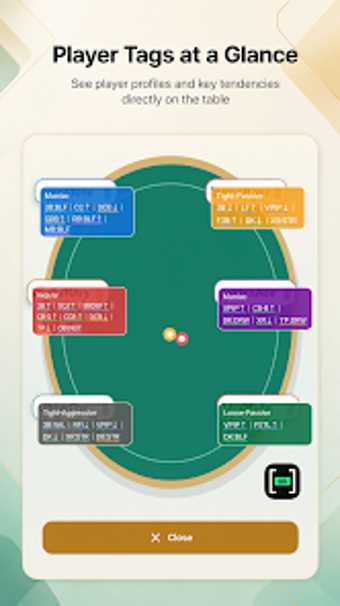
Show saved opponent notes directly over a poker app while on-device OCR identifies names from the screen, offering real-time context during play. PokerHUD - Player Notes, from pokerhud, combines a searchable player library and customizable tags with an overlay HUD to surface notes without switching apps. It targets serious poker players who keep detailed opponent records and need immediate access to those records during live or online sessions.
What the app does during play
PokerHUD matches visible table names to stored profiles by capturing the device screen and running on-device text recognition. The app maintains a searchable player library with name aliases, tags, and custom abbreviations, so a matched name pulls the associated note into an overlay HUD displayed above the poker client. The library supports platform-specific details so records can include where a player typically appears.
How it behaves on your device while running
On-device processing keeps identification local but requires runtime permissions. The OCR runs from captured screen images on the device, and the app needs screen-capture and overlay permissions to function. Local-first storage provides offline access, and cloud sync is available for signed-in members who want restoration across devices. The processing model avoids server-side image uploads by design.
Is it safe and practical during live sessions
The tool avoids controlling other apps and processes images locally, so it does not click or operate the poker client. Captured images are processed for text recognition on-device and are not saved or uploaded, matching a privacy-focused workflow. The overlay HUD offers immediate access to notes, though users must grant screen-capture and overlay rights before use, which requires deliberate setup on Android devices.
Practical for dedicated players who accept permission trade-offs
PokerHUD suits players who maintain extensive opponent records and want those notes visible without leaving a table, but it requires granting screen-capture and overlay permissions to work. For those willing to enable those permissions, the app delivers quick, on-device identification and local data control; users who avoid runtime screen access on their device should expect a significant setup trade-off.